Invoices from email. With the right accountant.
Your accountant needs invoices. You have a business to run.
HeyRup finds PDF invoices in your mailbox, sorts them and sends them to the right accountant. You decide on unclear cases and delivery.

Time savings estimate
Less searching. More time for your work.
Compare finding and sorting invoices by hand with your own work in HeyRup. The figures below are an adjustable example, not measured customer results.
Invoices per month: 50
By hand
100 min
Your time in HeyRup
15 min
Monthly difference
85 min
This counts your active time after initial setup. It excludes processing waits, the first mailbox connection and rule setup, and documents outside the connected mailbox. More unclear invoices mean more review time.
How to measure the saving with your own invoices →For business owners with multiple activities
Three businesses. Two accountants. One full inbox.
A hosting invoice arrives at your work email, a subscription at your personal address. Some purchases belong to the business, others to you. And when your accountant needs the documents, you go through the same messages again, wondering what you have already sent.
Set the rules once. HeyRup uses them for the next batch of invoices too.
I have multiple businesses →How it works
Get the invoices together. Get on with your day.
Connect your email account
We start with IMAP. The Gmail connector is in preparation.
- IMAPFirst at launch
- Planned

- Planned

- Planned

- Planned

- Planned

- Planned

- Planned

- Planned

- Planned

- Planned

- Planned

- Planned

Connect your email account
Choose the period to search and HeyRup shows the invoices it finds. You can see which mailbox and period they come from.
Confirm which business each invoice belongs to
Add your businesses and their document recipients. The invoices we find help us suggest your first sorting rules.
Review and send to your accountant
Open the original PDF, resolve unclear cases and send selected documents to your accountant. Check the recipient and package contents before confirming.
Inside HeyRup
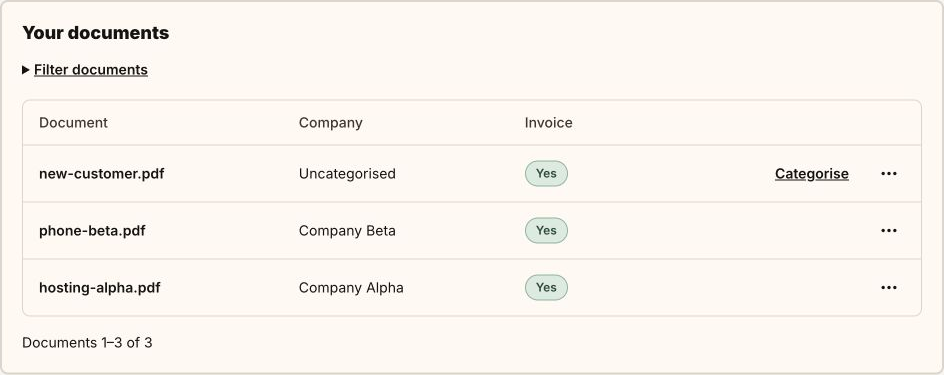
Two companies. Three documents. One decision.
Hosting belongs to Alpha, the phone bill to Beta. The third document needs you to assign it. You can see exactly which invoice needs attention.
Rules you understand
Your rules do the sorting. You make the judgement calls.
HeyRup assigns invoices to the right business using rules you have approved. Personal purchases stay separate. If the business named on an invoice is unfamiliar or two rules conflict, we show you the document and ask you to decide.
We will not start using a new rule without your confirmation. Other documents that have been clearly assigned can continue in the meantime.
Illustrative sorting example
No additional sign-in
Invoices sent straight to your accountant's email.
We send an email with the original PDFs to the selected address. If the documents do not fit in one message, we split them into parts. HeyRup shows what was sent and what still needs attention.
If a single file is too large for an email, we will let you know and offer a download. You can share it through another channel agreed with your accountant.
HeyRup for accounting firms →What your accountant receives
Original PDFs. Each assigned to the right company.
Review and download the assigned documents. Give your accountant PDFs they can open without a HeyRup account.
Open the sample PDFs. They contain fictional data and are not accounting documents. HeyRup does not issue invoices.
Is it right for me?
When paperwork gets lost in email.
HeyRup helps when…
You receive PDF invoices in email, prepare them for your accountant, and need to separate different companies’ documents or personal purchases.
We need documents as PDF email attachments
Scan receipts to PDF and have portal documents delivered as PDF attachments. JPG/PNG photos and portal links are not supported yet. HeyRup does not replace accounting software or your accountant’s judgment.
Your mailbox. Clear rules.
Mailbox access has a specific purpose.
Encrypted IMAP connection
We store credentials encrypted. You can disconnect your mailbox. We do not change, delete or mark messages as read.
You know what is being processed
We process PDFs on the server using rules, OCR and, where needed, AI. We do not use the data for advertising or to train general-purpose models.
Working copies for three months
We use documents for sorting and handover. We delete their content three calendar months after the first import.
Start small
Your first ten invoices each month are free.
Find invoices, sort them and send them to your accountant. Paid plans are in preparation. Businesses within one organisation share the same allowance.
View pricing →Before you get started
Questions you might have.
What exactly does HeyRup do?
It finds PDF invoices in your connected mailbox and sorts them using rules you approve. Resolve unclear cases before sending. Send selected documents to your accountant directly from HeyRup, or download them.
Do I have to open the app every month?
Send documents once after reviewing the preview, or enable a recurring schedule. Choose the businesses, accountants and document scope. Resolve unclear cases first.
Can I have multiple businesses and accountants?
Yes. Set up businesses, rules and recipients within one organisation. Send each accountant the documents for their businesses and keep personal purchases separate. The plan allowance is shared across the organisation.
Does my accountant need a new account?
No. Your accountant receives PDF attachments by email. They do not need a HeyRup account or a different accounting system.
Will you find absolutely all my documents?
HeyRup searches for PDF attachments in the connected mailbox and the selected period. Invoices available only in supplier portals, paper receipts and documents outside connected sources must be added separately. A completed search refers to this scope, not the completeness of your accounting records.
How do you handle personal purchases?
Personal purchases are not automatically sent to your accountant. You confirm which items belong to each business, and we resolve unclear cases with you. HeyRup does not determine whether a particular expense is tax-deductible.
Why do you need access to my mailbox?
To find messages with PDF attachments and recognise invoices. For IMAP, enter the server, username and password, or an app password. We store the password encrypted. You choose the folders to read; we do not change, delete or mark messages as read.
How long do you keep my invoices?
We retain working copies for three calendar months from the first import. Repeated searches or sending do not extend this period. Arrange long-term document retention separately; we do not delete the original attachments in email.
Need specific instructions? Open help →
Explore HeyRup
Less chasing invoices
Start your next handover with the invoices already together.
Connect your mailbox, check the invoices found and send them to the right accountant.
I want to recommend HeyRup to clients →