
Open the document and check the buyer
Consider two companies and one entrepreneur's personal purchases. All use the same online shop, sometimes under one customer login. Automatically sending every shop message to the first company's accountant gives a fast process but incorrectly divided documents.
Check the customer’s business name and company ID on the invoice itself. They are a better guide than the email sender. If the details are wrong or the document covers both personal and business purchases, set it aside for review and add what you know about the purchase.
Sorting is not accounting assessment. A purchase's connection to a company does not alone determine tax treatment. In disputed cases, provide a truthful purpose description to the accountant and ask for advice rather than hiding a conclusion in the filename.
A company laptop, a personal phone bill, and a train ticket
A laptop may be invoiced to company Alfa and used by its colleague. A phone bill may be in your personal name despite some business calls. A ticket may not reveal which client you visited. These are three different situations that “all electronics and transport belong to the company” will not solve.
For the laptop, checking the correct buyer may suffice. For the phone, agree a specific process with your accountant and possibly correct the operator's settings. For the ticket, brief trip context helps. What matters is not a folder for every purchase but retaining the information for correct handover.
When the same purchase type recurs, a rule makes sense. But base it on a verified case. A new supplier for a known buyer is not the same as an invoice to an entirely new company.
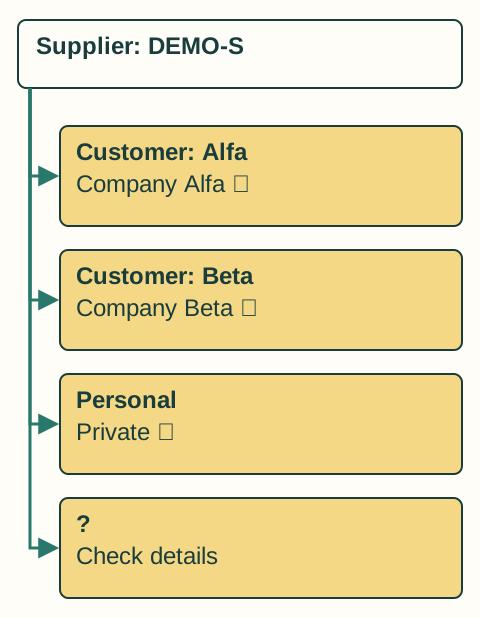
Leave room for unclear cases
Practical sorting needs personal documents and a decision area alongside named companies. An unclear invoice can wait there without automatically reaching an accountant or blocking everything else. Note the question for each item: wrong company ID, unknown project, personal portion or insufficient context.
Once the invoice is clarified, decide whether the same answer applies to future purchases. If not, correct only this document. A supplier-wide rule could move future invoices that belong elsewhere.
For automatic handover, a specific company should be linked to an approved recipient. A new address inside an invoice is not itself an instruction about where to send the document.
The best correction often starts in the customer account
If the same supplier repeatedly issues documents to the wrong entity, re-sorting is not enough. Check billing details and order settings. Separate customer accounts for two companies may help if supported and operationally sensible.
Resolve corrections to already issued documents with the supplier. Do not rewrite the original PDF to make it look different. The accountant needs to know both original and corrected versions exist and understand their relationship.
Send your accountant only the documents for the business they handle. Check shared folders too: access to a parent folder could reveal personal documents or records for other companies.