An identical copy is identified differently from a similar document
The simplest case is an identical PDF in the original email and a forwarded message. The content has not changed; it simply took another route to your folder. You generally do not want to present that copy as a new document to the accountant. Still, knowing where it came from and that it has already been handed over can be useful.
A document that looks similar is more complicated. The same supplier, amount and filename regularly recur with subscriptions. An August invoice and a September invoice are not copies just because the service costs the same each month. Likewise, several independent suppliers may use “2026-001”.
Compare the supplier, customer, invoice number, and purchase. If you are still unsure, keep both files and ask. Deleting too quickly could remove a document you need.
Three pairs with different outcomes
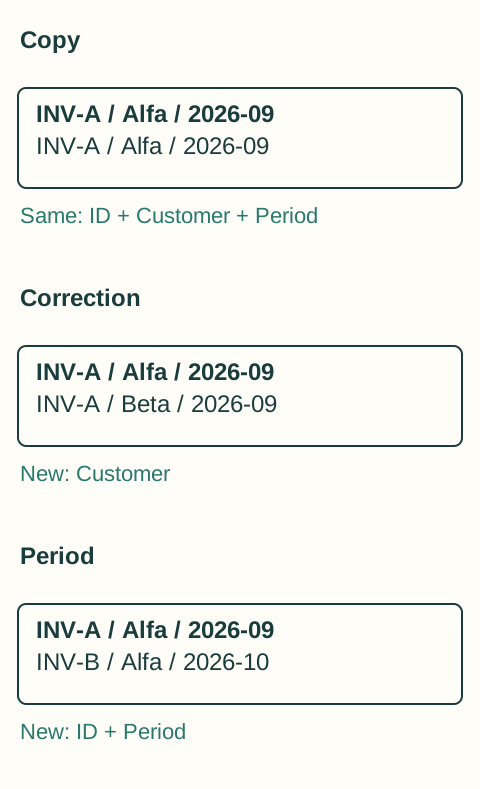
First pair: you download a PDF from the original message and later from its forwarded version. The documents have identical content. One copy and a record that it was handed over are enough when preparing the package.
Second pair: the supplier originally used your name, then corrected the buyer to the company on request. The filename is similar and the amount unchanged, but the content changed substantially. The new version cannot simply be discarded as a duplicate. Your accountant needs to know which version they received earlier and what the supplier corrected.
Third pair: two invoices for the same subscription differ in period and document identifier. These are two separate purchases despite the same amount. This pair is a good test of automatic comparison: simplifying by supplier and price would create a false duplicate.
Excluding a copy from handover is not deleting history
When tidying up, distinguish the accountant's package from your own record of origin. You can remove an obviously redundant copy from the package without immediately deleting the original email. For an uncertain pair, preserve both versions and add a short explanation.
For example, you handed over supplier Studio's invoice 2026-347 on both 4 and 8 September. Once comparison confirms identical contents, write: “Studio invoice 2026-347 is the same copy in both handovers. The second email is not another purchase. Please check whether you already have it on record.” Keep the original messages. If the second PDF changes the buyer or period, do not send that explanation: describe the difference and hand over both versions for a decision.
Do not manually rewrite a corrected document. Keep the supplier's version and, where relevant, their message about the change. If it is unclear whether it is a corrected copy or a new corrective document, ask the accountant or supplier to clarify.
Remove the reason the same PDF keeps returning
Repeated copies often arise from overlapping routes rather than human mistakes. An invoice arrives in two mailboxes, a colleague sends it again just in case, and someone also downloads it from the portal. First establish which source should be normal and which handover is only a backup.
With automated collection, check what happens when the same invoice is found a second time. You should be able to tell that you already have it and whether it was handed over. If you correct extracted data, the change should also be traceable.
Even a well-organized folder will occasionally contain two similar files. What matters is knowing whether they are copies, corrections, or separate purchases—and keeping that information for the next handover.